

AI Voice Agents - The Complete Guide to Voice Chat (2025)
Learn everything about an AI voice agents, its benefits, implementation tips, and the AI voice chat applications for business success.
Longer wait times, high call volumes, and language barriers in call centers often frustrate customers. Complex interactive voice response (IVR) menus only add to the problem, leading to customer dissatisfaction. That’s why companies are adopting smarter self-service solutions like artificial intelligence (AI) voice agents. In fact, experts predict the voice bot market will reach $98.2 billion by 2027, showing a clear trend toward smarter solutions to improving customer experience.
AI voice agents technology combines Natural Language Processing (NLP), machine learning, and voice recognition to transform customer interactions. It provides quicker, more efficient service and improves the overall customer experience.
In this guide, we'll explore what AI voice agents are, their key features, practical use cases, and tips on how to implement a voice agent in your business.
What is an AI voice agent?
An AI voice agent is a two-way conversational tool that communicates with the customer. It automates inbound and outbound calls without human intervention and transfers calls to a human agent when needed.

The biggest advantage? Callers can navigate an IVR by speaking naturally, without listening to long, complex menus or pressing numbers on a keypad.
Popular AI voice agent examples include Apple's Siri, Google Assistant, and Amazon's Alexa. These tools simplify interactions, provide instant answers, and automate tasks. In contrast, advanced bots like IBM’s Watson Assistant and Microsoft’s Cortana handle customer support, sales inquiries, and internal communications.
Types of AI voice agents
Here’s a breakdown of the four main types of AI voice agents and how they can benefit your business:
Rule-based AI voice agent
Rule-based voice agent use predefined sets of questions and rules to offer answers or perform tasks. Such voice agents handle routine tasks and customer FAQs. They answer all queries that fall under the if-this-then-that logic.
For example, an e-commerce site using a bot to guide customers in checking their order status or a banking site handling routine inquiries like balance checks, bill payments, transaction histories, etc.
AI-assisted voice agent
AI-assisted voice agents use machine learning and natural language to interpret conversations so they can analyze the context and grasp what the speaker means. This makes them far more capable and user-friendly than the conventional, rule-based voice agents.
Let’s suppose a user asks Alexa, 'What's the weather tomorrow?' and then follows up with, 'How about next week?' it remembers the context. This adaptability means customers don’t have to repeat themselves, creating a more contextual customer experience.
Conversational AI voice agent
Conversational voice agents make conversations using natural language. They’re more nuanced than AI-assisted voice agents as they can handle complex conversations using everyday language to create more personalized interactions.

Google Duplex, and IBM Watson Assistant, are examples of conversational voice agents. They can make phone calls, make reservations, and handle natural conversations with a human-like tone.
Voice-activated voice agent
These bots use voice commands to answer practical questions and perform routine tasks. They are more flexible than personal voice agents that adapt to speakers and perform customized tasks.
Such bots serve as digital assistants to AI-assisted bots like Siri.
How does an AI voice agent improve customer engagement?
A customer calling your sales team wants to feel valued and understood. An AI voice agent does that. It puts the customer at the center, creating a better experience and driving business benefits as a result. Let’s understand it with a few use cases.
Use case: Get a quick update on order status, 24/7

Assuming the AI voice agent is integrated into your CRM, it greets the customer by name. Instead of navigating through a branched IVR to get their order status, the customer can simply say ‘order status’ and the voice bot pulls out the order details from the CRM and gives the user a real-time update within seconds.
Sheraz Ali, the Founder of HARO Links Builder states that their voice agent managed over 30% of customer interactions in one of their company projects and drastically reduced wait times.
“It also improved our response efficiency and led to a 20% increase in customer satisfaction scores and a reduction in operational costs within three months.”
Benefits:
- Decreased waiting time.
- Limited IVR menu navigation.
- No human intervention is required.
- Quick response times.
- Reduced business costs.
- Tangible increase in customer satisfaction.
Use case: Improve language learning for students

A language learning platform uses a voice agent to provide real-time translations and personalized tutoring. So the voice agent instantly supports students in any subject by translating and clarifying complex terms in their preferred language.
Benefits:
- Reduced requirement for multilingual staff.
- Increases inclusivity as the bot answers in the user’s preferred language.
- Language barriers are removed.
Use case: Improve patient outcomes in healthcare

It's easy to miss appointments or forget to deliver prescriptions to the patient’s home timely. A healthcare service can employ a voice agent to deliver personalized care and offer preliminary health assessments, medication reminders, and easy appointment scheduling, all according to the individual patient's needs.
Benefits:
- Saves time by streamlining appointment bookings.
- Ensures medication adherence with timely reminders.
- Reduces workload for healthcare providers with automated support.
Use case: Streamline routine financial services

Once integrated with the banking system, the voice agent automates routine financial tasks, provides instant account information, processes transactions, and delivers personalized financial advice around the clock.
Benefits:
- 24/7 access to financial services without wait times.
- Improves customer experience with quick, accurate responses.
- Automates routine tasks, freeing up staff for complex queries.
- Provides personalized advice to improve financial decision-making.
Use case: Get personal shopping assistance

An e-commerce platform can use a voice agent to assist customers with product selection, provide personalized recommendations, and automate the sales process from start to finish.
Benefits:
- Delivers a personalized shopping experience 24/7.
- Boosts sales with customized recommendations.
- Reduces cart abandonment by guiding customers to checkout.
- Improves customer satisfaction with fast, accurate service.
Features of an AI voice agent
To understand why voice agents are so effective, let’s look at the key features that improve the overall customer service experience while streamlining business operations.
The best voice agents for businesses come equipped with:
Natural language understanding (NLU)
An AI voice agent understands user queries by converting speech into text using AI and NLP. It then forms an appropriate response and converts it back into speech using text-to-speech (TTS) technology. This ability to understand and respond in natural, conversational language sets AI voice agents apart from traditional IVR systems, which rely on rigid, menu-based responses.

Personalization capabilities
Customers want quick, personalized responses to their queries, unlike complex IVR systems that frustrate them with lengthy menus. An AI voice agent offers contextual conversations, adapting to the user’s intent. It detects speech cues, skips irrelevant interactions, and also transfers calls to the right agent.
Hence, when comparing voice agents to IVRs, the bot's ability to offer personalized interactions like a human outshines communication systems that follow even the best IVR practices.
Multi-language support
AI voice agents break down language barriers, supporting multiple languages to provide a more inclusive and accessible customer experience. Businesses can easily connect with diverse customer bases across the globe.
For instance, Plivo supports speech recognition in 27 languages and their regional variants.
{{cta-style-1}}
Integration with other platforms and services
AI voice agents easily integrate with platforms like customer relationship management (CRM) systems, Enterprise resource planning (ERP) tools, and ticketing software. They access and update customer data in real time to ensure accuracy.
These bots also pull relevant details, automate follow-up actions, and sync with communication channels like email or chat. This creates a personalized and consistent customer experience across all touchpoints.
Benefits of voice agents
Let’s now look at the benefits of AI voice agents.
Enhanced user experience
Many businesses have concerns over the quality of a voice agent for customer service. However, a voice agent answers queries quickly regardless of the time of the day. Speedy, reliable answers are important to providing excellent service, making voice agents an invaluable tool for businesses looking to improve customer satisfaction.
Additionally, businesses can:
- Handle routine queries and common tasks faster than human agents.
- Remove the need for users to navigate complex IVR menus.
- Manage high-volume calls without errors.
Better cost efficiency
An AI voice agent doesn’t just save time, it also saves money. It boosts user satisfaction and reduces support times by automating repetitive queries. This frees up staff for higher-value tasks, and interacting with customers after hours has improved lead conversion.
The direct benefits to businesses are:
- Reduces the need for a larger customer support team.
- Allows human agents to focus on complex, high-value inquiries.
- Engages users outside business hours to boost marketing return on investment (ROI).
- Lowers training costs and minimizes the risk of providing incorrect information.
Accessibility for users with disabilities
With over one billion people living with disabilities worldwide, voice agents make services more inclusive. They enable hands-free, accessible interactions, allowing customers with visual, motor, or cognitive impairments to engage with the business easily. This not only improves customer satisfaction but also broadens the company’s reach to a more diverse audience.
Data collection and analysis for improved services
Voice agents don’t just serve customers — they also gather insights. Use this data to analyze data and improve services, personalize marketing efforts, and make more informed business decisions.
24/7 availability
Unlike human agents, voice agents are always accessible. They ensure customers get help whenever they need it, contributing to a more consistent and reliable customer experience.
Future of AI voice technology
As IBM's data engineer, Chris Hay puts it, "We're entering an era where every mom-and-pop shop can have the same level of customer service as an enterprise." This statement captures the transformative potential of voice recognition technology.
AI voice chat applications benefit businesses of all sizes by delivering top-tier customer experiences. Tech giants are already paving the way. Microsoft has updated its Copilot AI with advanced voice capabilities, allowing it to handle complex queries with natural language reasoning, while Meta has introduced voice AI to its messaging apps.
AI voice assistants will move beyond smartphones, integrating into wearable devices like the recently unveiled Meta Orion augmented reality glasses. For businesses handling sensitive client relationships, this could mean smarter, empathetic bots that mirror the tone and approach of a human assistant.
Key upcoming trends:
- Hyper-personalization: Customized voices and targeted recommendations.
- Advanced problem-solving: Managing complex queries using natural language.
- Real-time analytics: Analyzing customer tone for deeper insights.
Yet, challenges remain. Arvind Rongala, the founder of a skill-management solution provider, shares, “There are still issues, especially with data privacy and ensuring interactions are human-like. In addition to resolving problems with bias in training data and regulatory compliance, businesses must strike a balance between automation and personalization. For example, adhering to GDPR regarding the storage of voice data can be challenging, but doing so is essential to fostering trust.”
Ultimately, businesses need to prioritize data security, explore multi-device integration options, and develop stronger contextual understanding for natural interactions.
Launch an AI voice agent with Plivo
Any scaling business needs a voice agent that's easy to integrate, globally accessible, and cost-effective without sacrificing quality.
Plivo checks all these boxes, offering seamless integration, seven global points of presence for low-latency interactions, and competitive rates starting at just $0.0040 per minute. It's ideal for businesses willing to scale while keeping operational costs in check.
In fact, Plivo can reduce operational costs by up to 40%.
Moreover, its commitment to reliability is backed by a 99.99% uptime guarantee, with failover capabilities that switch within two seconds if any disruptions occur.
You can launch voice agents with Plivo using just a few lines of code.
- Log in to your OpenAI Account: Secure your API key and RealTime API access.
- Log in to your Plivo Account: Sign up and get a voice-enabled number.
With integration options for leading speech-to-text (STT) and TTS providers like Deepgram and ElevenLabs, you can launch AI voice agents in multiple regions, including India, using local numbers.
Use Plivo-powered voice agents for:
- Personal shopping assistance: Offer personalized recommendations, go through product selections, and close sales.
- Healthcare automation: Improve patient outcomes with medication reminders, and appointment scheduling, and offer preliminary health assessments.
- Inclusivity in education: Break language barriers in learning with real-time translations and personalized tutoring across multiple subjects.
- Routine financial services automation: Provide instant account information, personalized financial advice, transaction processing status, etc. to customers.
With a 24/7 AI voice agent, your business can handle these tasks around the clock, ensuring that customers are never left waiting. Want to improve customer experience with Plivo? Contact us today.

AI Voice Agents for Real Estate (2026): 10 Tools Compared, Real Limitations and What Actually Scales
Compare 10 AI voice agents for real estate in 2026. Evaluate response time, CRM integration, multi-channel support, and scalability to find the right solution.
AI voice agents in real estate are all about response time, coverage and quick follow-through. If your system can't answer calls immediately, qualify intent, book tours and update your CRM without manual cleanup, it's not helping you win more deals; it's adding another layer for you to manage.
This guide isn't for browsing tools. It's for operators deciding whether to commit to AI voice agents in 2026 and ship something that actually helps you scale. We compare 10 platforms based on how they perform after signup, how fast you can go live, what breaks under real lead volume, and what it takes to keep them working week after week.
Top 10 AI Voice Agents for Real Estate (2026)
The goal here is simple: Helping you choose an option that you can launch confidently, not replace after the first integration headache.
1. Plivo
When aiming to build and scale AI voice agents for real estate, you care about two things: reaching prospects first and converting more inquiries into confirmed showings. Plivo excels here since it gives you production-ready AI voice agents that place instant callbacks, answer listing questions from your data, and book tours directly on your agents' calendars. They operate reliably across phone, SMS, WhatsApp and chat without stitching together telephony, AI models and messaging vendors.
Plivo is the AI agent builder platform for voice-first, omnichannel experiences—built on a carrier-grade telephony network trusted by Uber, Meta, Zomato, and thousands of businesses worldwide. Business teams can launch agents without writing code using Vibe agent. Engineering teams can orchestrate custom voice agents in code with full control. The foundation is Plivo's global communications infrastructure spanning 190+ countries: 15+ years of proven reliable infrastructure, low latency, and the call quality enterprises demand.
Core Capabilities:
- Inbound & Outbound AI Voice Agents: Handle live calls end-to-end, qualify intent, route intelligently and escalate to human agents when needed.
- Multi-Channel Agent Coverage: Run the same AI agent across phone, SMS, WhatsApp and chat with shared context across channels.
- No-Code AI Agent Builder (Vibe): Build and deploy voice agents using plain-English instructions, no prompt engineering or coding required.
- Build your way: Business teams launch with no-code tools; engineering teams build custom voice agents with full-code control. You're never forced into a single way of working.
- Vertically Integrated Telephony (CPaaS): Voice runs on Plivo's own global telephony infrastructure, avoiding third-party carrier dependencies.
- Low-Latency Voice AI Stack: Integrated TTS, STT and LLM orchestration enables sub-500ms response latency, critical for natural voice conversations.
- Enterprise-Grade Reliability: Built on Plivo's proven CPaaS platform with 99.99% uptime, 15+ years of reliable infrastructure, and global carrier connectivity across 190+ countries.
- CRM & Workflow Integrations: Pull customer context in real time and write call outcomes back to CRMs and support tools automatically. Connect Follow Up Boss, kvCORE, BoomTown, Salesforce, HubSpot, Google Calendar, Outlook, and your MLS/IDX feed.
- You own the stack: You get to choose your speech-to-text (STT), text-to-speech (TTS), and LLM while keeping prompts and data portable and avoiding lock-in.
Best fit if you:
- Need real-time voice agents that can operate continuously at scale.
- Want to avoid stitching telephony, AI and messaging vendors together.
- Plan to deploy across multiple channels, not voice alone.
- Have defined workflows for lead qualification, routing or follow-ups.
Not a fit if you:
- Only need a lightweight voice demo, basic IVR or short-term experiment.
- Want a fully turnkey, real estate-specific tool with no configuration or workflow control.
- Don't plan to integrate voice agents into your CRM, data stack or operations.
2. Luron AI
Luron AI is best suited for teams that need 24/7 AI voice agents that never miss calls and qualify leads automatically. It supports multilingual conversations and keeps pacing tight across accents and speaking styles. The system handles inbound and outbound voice conversations in dozens of languages and automates bookings and follow-ups without human staffing.
Core Capabilities:
- Instant call answer & qualification: AI answers every call, gathers intent, and qualifies leads without hold times.
- Multilingual support: Handles AI conversations in 45+ languages to cover diverse lead sources.
- Inbound & outbound support: Manages both types of calls and can also run outbound follow-ups.
- SMS, chat & email automation: Extends voice agents to text and messaging channels for a unified engagement approach.
- CRM & integration options: Connects to existing phone systems via SIP trunking and can integrate with CRMs and ticket systems.
Best fit if you:
- Want 24/7 lead capture and qualification without adding staff.
- Need multilingual voice conversations for global or diverse markets.
- Expect to automate bookings, follow-ups and reminders on voice and messaging channels.
- Have a CRM or existing phone system you must integrate with.
Not a fit if you:
- Only need a simple inbound answering or IVR replacement without automation.
- Want a solution focused on voice only, with limited channel reach.
- Prefer fixed, transparent pricing tiers publicly listed.
3. Callers AI
Callers AI is a platform for automating customer conversations with human-like voice agents that handle both inbound & outbound calls and messaging channels, powered by your brand's data and tone. It's focused on scaling high-volume voice interactions while maintaining contextual continuity across channels in a single branded voice experience.
Core Capabilities:
- Omni-channel AI interactions: Voice agents run across phone, SMS, WhatsApp and chat from a central AI brain.
- Human-like voice calls: Agents answer and place calls in a natural conversational style.
- Lead workflows & use cases: Supports lead qualification, cold call automation, appointment confirmation, retention flows and more.
- 24/7 availability & language breadth: Designed to handle calls and messaging around the clock, in multiple languages.
- Context remembering: Conversations carry context across voice and messaging so follow-ups feel continuous.
- Integrations & automation: Connects to CRMs and tools (300+ integrations) so call outcomes can update your systems.
Best fit if you:
- Want both inbound and outbound AI calling with consistent, natural-tone responses across channels.
- Need an AI system that can qualify leads, confirm appointments and manage follow-ups automatically.
- Are scaling high call volumes 24/7.
- Prefer a central "brain" that keeps context across channels and workflows.
Not a fit if you:
- Only want a basic voice or outbound dialer with limited cross-channel logic.
- Need a tool focused exclusively on simple IVR or basic routing without AI conversation layers.
- Prefer a product you can set up and forget in minutes without upfront configuration or workflow definition.
4. SquadStack AI
SquadStack AI is best suited for teams that want AI-assisted sales and voice engagement workflows supported by configurable human-in-the-loop automation. It blends automated outreach and qualification with options to escalate to human agents where needed, helpful for revenue teams that are focused on pipeline speed.
Core Capabilities:
- Automated Lead Engagement: AI enabled workflows proactively contact prospects and qualify them using data-driven sequencing.
- Voice & Messaging Channels: Supports outbound dialing, ringless voicemail, SMS and multi-touch sequences.
- Human-in-the-Loop Escalation: Configurable handoffs to live agents when conversations need human judgment.
- Sales Workflow Automation: Built-in logic for lead routing, prioritization and follow-ups across channels.
- CRM Integration + Data Sync: Sync outcomes and engagement data back to CRMs like Salesforce, HubSpot, etc.
Best fit if you:
- Want inbound and outbound automated voice interactions with natural conversation flows and multilingual capability.
- Need AI that handles lead qualification, follow-ups and reminders as part of sales or customer engagement sequences.
- Are automating sales outreach and conversational workflows alongside voice calls.
Not a fit if you:
- Need an AI platform focused on low-latency, bespoke voice agent infrastructure tied tightly to your own telephony stack.
- Are building a multi-channel bot with CRM/telephony hooks and developer control from the ground up at scale.
5. Telgent
Telgent leans into MLS and portal context. It is best for businesses that want always-on voice AI calling with automated scheduling, intelligent call handling and quick setup. Its platform emphasizes immediate activation, seamless integration with existing phone systems and natural AI responses that handle calls, schedule meetings and engage customers day and night.
Core Capabilities:
- 24/7 AI voice calling agents: Always-on call automation that answers and routes customer calls at any hour.
- Lead engagement & scheduling: Automatically books appointments, meetings and showings based on natural language conversations.
- Inbound call handling: AI answers incoming inquiries, qualifies intent and routes prospects with minimal human intervention.
- Automated inquiry responses: Provides instant answers to property questions and responds to rental or sales leads.
- Integration with real estate systems: Works with Zillow, Realtor.com, MLS platforms, Follow Up Boss, kvCORE, BoomTown, Salesforce and HubSpot for CRM continuity.
Best fit if you:
- Need round-the-clock call handling that captures leads and books appointments without missing inquiries.
- Want your voice AI to integrate with core real estate tools and CRM systems so client details are synced automatically.
- Are focused on lead conversion and showing scheduling as part of your customer engagement workflows.
Not a fit if you:
- Only require basic outbound calling with simple scripts rather than inbound + scheduling automation.
- Expect a no-config, plug-and-play voice bot that requires zero setup or customization.
- Want a platform that handles only one channel (voice only) without extending into SMS/WhatsApp/chat automation.
6. AIOnCalls
AIOnCalls is positioned as a virtual receptionist that never misses calls or opportunities. Best for teams that want an always-on voice AI assistant that handles inbound and outbound calls around the clock, engages callers in natural language, qualifies leads, books appointments and updates CRM data.
Core Capabilities:
- 24/7 Inbound & Outbound Voice Handling: AI answers and places calls around the clock across all hours and holidays.
- Lead Qualification & Follow-Up Automation: Qualifies callers in real time and automates follow-ups via voice, SMS and email.
- Appointment Scheduling & Calendar Invites: Books appointments and sends confirmations during calls.
- CRM & Workflow Integrations: Integrates with CRMs like Zoho, HubSpot, GoHighLevel, Google Calendar for real-time lead syncing and activity logging.
- Multilingual Conversations: Supports multiple languages and can handle simultaneous call sessions.
- Live Agent Escalation: Transfers complex calls to human agents when needed.
- Real-Time Analytics & Transcriptions: Provides live call monitoring, transcripts, sentiment analysis and dashboards.
Best fit if you:
- Need an AI voice agent that never misses inbound calls and engages leads immediately, 24/7.
- Want automated lead qualification, booking and follow-ups in voice, SMS, and email without human staffing.
- Are integrating call outcomes and engagement data into CRM or calendar workflows.
- Operate in industries where speed-to-lead matters and missed calls are costly.
Not a fit if you:
- Only need simple IVR or on-premise call routing without conversational automation.
- Prefer a pure telephony or developer API platform without built-in AI conversational layers.
- Are looking for a voice agent with deep, specialized industry templates.
7. Brilo AI
Brilo AI is a business-focused AI phone and voice call agent platform that enables teams to automate real-time voice interactions across industries like real estate. It promises fast setup, natural human-like voice responses, 24/7 coverage, integration with business tools and built-in analytics, all without needing a technical team to get started.
Core Capabilities:
- 24/7 AI voice call agents: Always-on AI phone agents handle inbound calls and customer engagements at any hour.
- Human-like voice interactions: Conversational voice responses built to sound natural and engaging.
- Appointment booking & scheduling: Voice agents can book appointments with synced calendars and handle reminders.
- CRM and business integrations: Integrates with a broad range of business apps (6,000+ app connections claimed) to sync customer context and outcomes.
- Real-time analytics & insights: Live call transcripts, sentiment analysis, intent tracking and topic detection support actionable insights post-call.
- Lead qualification automation: Agents engage prospects, capture intent and route high-value leads in real time.
Best fit if you:
- Need 24/7 automated voice engagement that never misses inbound or high-volume calls for lead capture, scheduling or support.
- Need a platform that books appointments, manages follow-ups and drives customer engagement without manual management.
- Plan to integrate the voice agent with CRM, calendar tools and analytics pipelines to maintain context across systems.
Not a fit if you:
- Simply need a basic phone tree, IVR or traditional call routing system.
- Are focused solely on developer-centric API telephony without AI built in.
- Require industry-specific compliance guarantees (HIPAA, PCI, etc.) documented publicly.
8. VocalDesk
VocalDesk is an AI-enabled voice and contact automation platform that helps teams automate calling, lead follow-up, support interactions and scheduling. Its focus is on automated voice conversations and multi-channel engagement with CRM integration and configurable workflows that replace manual outreach tasks.
Core Capabilities:
- Automated Voice Conversations: Handles inbound and outbound calls using AI to engage, qualify, and route callers.
- AI-Driven Lead Qualification: Automated conversation flows that marks lead intent and priority.
- Appointment Booking & Reminders: Schedules meetings and sends reminders as part of automated flows.
- Multichannel Messaging: Engages customers across voice, text and messaging platforms.
- CRM & Workflow Sync: Connects with CRM systems and business tools to log interactions and maintain records.
Best fit if you:
- Want to automate call handling and lead follow-up without manual dialing.
- Need a solution that combines voice and messaging outreach with CRM context.
- Are focused on lead qualification and scheduling as part of broader sales engagement.
Not a fit if you:
- Only need basic call routing or IVR without AI handling.
- Require explicit developer control over telephony APIs.
- Rely on hard metrics like latency, concurrency limits or multi-region telephony SLAs.
9. Calldock
Calldock is an AI voice agent platform intended for instant lead engagement, automatic qualification and scheduling. Its system calls leads within seconds of form submission, conducts natural conversations and integrates with calendars and workflows to automate follow-ups and booking.
Core Capabilities:
- Instant lead callbacks: Calls website leads within ~60 seconds of a submission, boosting early engagement.
- Calendar booking: Agents can book appointments directly to your calendar during live calls.
- Multi-channel follow-up: Agents send SMS and email follow-ups as part of the call workflow.
- Seamless handoff & callbacks: You can trigger human handoffs in natural language and schedule intelligent callbacks.
- API, webhooks, & integration ecosystem: Support for APIs and pre-call webhooks lets you fetch context before calls and connect with Gmail, Google Calendar, Slack, Zapier and thousands more.
- Developer playground & documentation: Provides API documentation and code examples for triggered calls and automated workflows.
Best fit if you:
- Want immediate lead engagement that happens in seconds.
- Need voice agents that qualify, book and follow up automatically across voice, SMS and email.
- Plan to integrate voice engagements with calendar and business workflows.
- Need a voice agent that works with easy templates for common industries with minimal setup.
- Want a low-code or no-code setup that goes live with simple configuration.
Not a fit if you:
- Need proper inbound/outbound calling with API integration.
- Require deep telephony infrastructure control or enterprise telephony SLAs.
- Are building highly custom dialogue systems that need proprietary LLM tuning beyond the existing templates.
10. Ylopo
Ylopo is a digital marketing and lead gen platform built for the real estate industry. It combines lead capture, nurturing, AI voice calling, AI texting, branded websites and marketing automation into one system that integrates with CRMs and helps real estate teams generate and convert leads.
Core Capabilities:
- AI Voice Follow-Up: Automatically calls new and existing leads to qualify interest and connect them to agents.
- AI Text Conversations: Runs two-way SMS conversations to nurture leads until they're ready to talk.
- AI² Voice + Text System: Combines calling and texting into one coordinated follow-up engine.
- Automated Appointment Transfers: Delivers live transfers or booked appointments when leads are qualified.
- Lead Generation & Nurture: Includes PPC ads, remarketing and IDX websites to capture and feed leads into AI follow-up.
- CRM & Website Integration: Syncs AI conversations and lead activity with CRMs and branded real estate websites.
Best fit if you:
- Want lead capture with nurturing as a unified system rather than isolated voice interaction tools.
- Are a realtor or team that wants AI to automatically engage leads by text and phone, not just manage manual contacts.
- Need branded websites with IDX search and integrated lead capture feeding into automated follow-up.
- Plan to keep leads engaged over longer time horizons (e.g., 90-day voice follow-up).
- Value combined marketing + AI follow-up rather than a single channel (voice only).
Not a fit if you:
- Are looking for pure AI voice agent infrastructure like a telephony-first CPaaS platform.
- Need tools focused on enterprise-grade telephony performance, low-latency voice systems or custom telephony workflows.
What Matters Most in AI Voice Agents (Beyond the Basics)
1. Telephony Ownership vs. Vendor Stitching
Many AI voice tools rely on third-party telephony stitched together with AI layers. This often introduces latency, call drops and limited routing control at scale.
What to prioritize:
- Built-in telephony with direct carrier connectivity
- End-to-end control over call routing and quality
- Fewer external dependencies
Plivo runs on its own global CPaaS and carrier-grade telephony stack, removing third-party voice dependencies.
2. Real-Time Performance (Latency & Uptime)
Voice conversations break down quickly when responses lag or calls fail. Sub-second latency and high uptime aren't "nice to have"—they're mandatory.
What to validate:
- Sub-500ms voice response latency
- 99.99% uptime or better
- Real-time STT, TTS, and LLM orchestration
Plivo's vertically integrated Voice AI stack is designed for low-latency, real-time conversations on proven infrastructure.
3. Multi-Channel Context, Not Disconnected Bots
Leads move between calls, SMS, WhatsApp and chat. Treating each channel as a separate bot creates broken experiences and duplicate work.
What to look for:
- Shared context across voice and messaging
- Unified conversation history
- Seamless handoffs between channels
Plivo supports multi-channel agents that share context across phone, SMS, WhatsApp and chat from a single system.
4. Integration Depth (CRM, Calendars, Workflows)
Voice agents don't operate in isolation. Without deep integrations, they become another silo your team has to manage.
Prioritize platforms that:
- Read from and write to CRMs in real time
- Trigger workflows during live calls
- Integrate cleanly with calendars and support tools
Plivo integrates directly with CRMs and business systems, allowing agents to act on live data and update records automatically.
5. Built for Scale, Not Just Launch
Many tools work well for pilots but struggle under sustained call volume or multi-region deployment.
Ask:
- Can this run continuously without degradation?
- Are pricing and performance predictable as usage grows?
- Will this still work when channels or regions expand?
Plivo's AI agents are built on infrastructure that already powers enterprise-grade voice and messaging at global scale.
FAQs
What's the fastest way to go live without breaking existing operations?
Start with a single, contained flow like after-hours inbound calls or instant lead callbacks. Connect your phone numbers, CRM and calendar, define escalation rules and launch! You can expand coverage once live data validates the flow.
How do I ensure voice quality doesn't feel robotic or laggy?
Voice quality depends on latency and telephony control. Platforms with integrated telephony and real-time STT/TTS orchestration keep responses sub-second, which is critical for natural conversations that callers don't hang up on.
How does the agent stay accurate and compliant with real estate data?
The agent should pull from a restricted, curated knowledge source (MLS, IDX, listings) and operate within defined guardrails. When questions exceed scope like pricing nuance, legal terms, fair-housing-sensitive topics, it escalates to a human automatically.
What happens when call volume spikes or multiple leads call at once?
Calls don't fail—they should queue. High-intent conversations can be routed to live agents, while others are qualified, scheduled or followed up asynchronously. Every outcome is logged so nothing gets lost.
How does this fit into my CRM and follow-up workflows?
The agent reads live CRM data during calls and writes outcomes back automatically in the form of notes, disposition, next steps and booked appointments. Your team picks up conversations with full context instead of starting from scratch.
Try Plivo Free
Curious how an AI voice platform performs in your workflows, not just in theory? Plivo offers a free trial account with credits so you can experiment with voice, SMS, WhatsApp and chat services before committing. When you sign up, you get trial credits, can add a phone number and start testing features like real-time voice interactions and multi-channel engagement using APIs or visual tools like PHLO. This lets you validate performance, integrations, and call flows with your actual data—all without upfront cost.
Plivo's trial lets you test core capabilities immediately, making it easy to see how quickly you can build, launch, and refine agents that handle calls, qualify leads and update systems in real time.
Get started with your free trial now and begin building your first agent today.

Best AI Voice Agents for Customer Support and Service (2026): What to Deploy Now
Compare 10 AI voice agent platforms for customer support. Get a practical 30-day pilot framework, implementation workflow, and outcome-driven selection guide.
1) Plivo — The fastest path to production-grade AI voice agents for customer support
A recent Gartner survey found that most customer service leaders plan to explore or pilot conversational GenAI in 2025—making a clear, near-term mandate to deliver something that works on the phone channel, not just in chat. That's your cue to build a reliable voice front door with an AI agent builder platform designed for voice-first, omnichannel experiences.
Why Plivo is #1
Plivo is the AI agent builder platform that lets you build your way. Whether you're a business leader who needs to launch fast or an engineering team building custom workflows, Plivo meets you where you are. Start with no-code tools that let non-technical teams deploy agents in hours. Go deeper with low-code orchestration for more control. Or build from scratch with full-code frameworks that integrate into your existing stack. You're never forced into a single way of working.
What it does for you
Plivo's Voice AI stack is modular by design. Want speed? Use the fully integrated platform—STT, LLM, TTS, and telephony—pre-configured and ready to go. Want control? Orchestrate your agents using code with Plivo's Agentic STT models and Telephony, alongside your preferred LLM providers. Want just the connectivity layer? Use audio streaming or SIP trunking and bring everything else yourself. You decide where Plivo ends and your stack begins.
Underlying it all is a reliable, carrier-grade telephony platform that scales for enterprises—global PSTN/SIP connectivity, number provisioning and porting, call routing with failover, recording with consent, and clean human handoff with full context into your CRM or help desk.
Segment-by-segment fit
If you're SMB, launch fast with no-code tools that let you deploy agents in hours, plus a simple dashboard and connectors for Shopify and Calendly. If you're mid-market, use low-code orchestration for more control, with a modular stack that lets you use what you need—swap in your preferred LLM, STT, or TTS. If you're enterprise, build with full-code frameworks that integrate into your existing stack, plus a modular Voice AI stack to pick-and-choose what you need, governance features (RBAC, audit transcripts, data residency), and contact center integration for high availability and reporting.
Start with Voice, go everywhere
Voice is the hardest channel to get right—and it's where Plivo leads. But the same flexible building experience extends to WhatsApp, SMS, RCS, and Chat. Build once, deploy across channels, and meet customers wherever they are.
Suitable for
- Fintech customer service: consent-first flows, secure keypad capture, dispute status, and callbacks.
- Healthcare scheduling: multilingual intake, appointment changes, escalations with a summarized handoff.
- Retail and logistics: order status, returns, delivery windows, and SMS/WhatsApp follow-ups.
No more choosing between a locked-in platform that's easy but limiting, or a DIY approach that's flexible but painful. Plivo gives you both—simplicity when you want it, depth when you need it.
Explore the Voice API, check pricing, review compliance, handle numbers & porting, browse case studies, or jump into the quickstart.
2) Google Dialogflow CX — Complex, branching flows without spaghetti
Key features
Dialogflow CX uses a flow-and-page model to capture state and branching, so you can manage multi-step intents like returns, warranty claims, and multi-factor verification without dozens of brittle intents. It supports voice and text and includes versioning, experiments, and test tools. For telephony, you can use partner gateways or SIP; for global reach, put Plivo at the edge and connect to CX.
Why it matters
Complicated support journeys need explicit state. CX gives you that structure. If your "Where's my order?" workflow forks based on identity checks, fulfillment method, and policy windows, you can keep logic readable and testable. CX also plays well with multilingual experiences and mixed initiative, so callers can change course mid-conversation.
Implementation steps
Start with a single high-volume journey and draw it as a CX flow. Add a fallback page with a short menu for noisy lines. Ground the bot in your knowledge base and order system, then add handoff rules. Put Plivo in front for numbers, routing, and recording consent, and pass summaries back to your ticketing system.
Suitable for
Teams with multiple brands or product lines, where branching grows quickly and consistency matters across regions.
3) Amazon Lex + Amazon Connect — AWS-first voice automation that ops can own
Key features
Lex handles the speech and NLU for voice and text. Connect adds the contact-center fabric: routing, IVR, call recording, and agent desktop. It's a natural fit if your data and apps live in AWS and security prefers IAM-managed access. For global numbers or bring-your-own carrier control, front with Plivo and route into Connect.
Why it matters
Staying inside AWS accelerates procurement, security reviews, and monitoring. You can call Lambdas for tool use, search knowledge with Kendra, and use Connect metrics and contact flows your ops team already knows. That shortens time to value and concentrates governance in one place.
Implementation steps
Define one call flow in Connect (ID&V → status lookup → handoff). Build Lex intents from your top FAQs. Add Plivo for number management, routing, and failover. Send summaries back to your CRM or help desk. Keep a barge-in plan for noisy environments and a keypad fallback for payment flows.
Suitable for
IT-led programs where AWS standardization, auditability, and a single pane of glass for monitoring are priorities.
4) IBM Watson Assistant — Governance-first deployments in regulated industries
Key features
Watson Assistant supports omnichannel conversations with documented security and governance options, including deployment paths designed for regulated workloads. If your risk office leads the decision, IBM provides clear guidance on audit logging, data handling, and architectural choices. Add Plivo to handle PSTN/SIP, call consent prompts, and compliant recording policies.
Why it matters
Financial services and healthcare teams often need auditability from day one. When you need clear data-handling boundaries and deployment models that align with internal controls, IBM's documentation and support track help you pass reviews without months of back-and-forth.
Implementation steps
Map your data-classification rules to Watson's deployment options. Keep contact recordings and transcriptions in your approved storage. Use Plivo's routing and consent prompts to standardize intake across regions. Summarize calls into your case system for full traceability.
Suitable for
Organizations with heavy compliance needs, strict data residency, or formal audit trails for every customer interaction.
5) Cognigy.AI — IVR modernization with fine-grained voice control
Key features
Cognigy combines a visual designer with a voice gateway that supports streaming ASR, interruptibility, and transfer control. It integrates with multiple speech providers and enterprise systems like SAP and Salesforce. This lets you tune barge-in sensitivity, error handling, and handoff cues rather than living with a one-size-fits-all IVR.
Why it matters
If callers still hear a menu tree, you're wasting time and goodwill. Cognigy helps you replace rigid menus with natural conversations and graceful escalation. You keep the levers you need—timing, sensitivity, fallback prompts—so the agent feels human, not scripted.
Implementation steps
Start with the two intents that create the most queue time. Set barge-in thresholds conservatively and widen them after you test in live traffic. Put Plivo at the edge to manage numbers, recording policies, and failover. Send summaries with disposition tags to your CRM.
Suitable for
Enterprises with legacy IVRs, high call volumes, and a clear need to reduce effort without ripping out the contact-center core.
6) Salesforce Agentforce — CRM-native service automation where your team works
Key features
Agentforce brings AI agents into the Salesforce console and data model. Your service team stays in the view they know, while the agent handles common intents, drafts summaries, and routes cases. Add Plivo for calling so every phone interaction lands in Salesforce with the right context.
Why it matters
When everything you need to resolve an issue already lives in Salesforce, keeping the agent there shortens integration time and improves analytics. Supervisors can coach on the same dashboard and review case summaries, while admins maintain clear governance over data and automations.
Implementation steps
Pick one queue with repetitive calls. Tie identity checks to account data and warranties. Keep a "press 0 for a human" fallback and make sure the agent passes a clean summary with next steps. Use Plivo for the phone edge so call recordings and consent are consistent across regions.
Suitable for
Service teams that treat Salesforce as the system of record and want automation to feel native—not bolted on.
7) Zoom Virtual Agent for Phone — A 24/7 receptionist and concierge
Key features
Zoom's Virtual Agent for Phone handles greetings, routing, and the most common requests. You train it from existing docs and site content, then turn it on for after-hours or full-time reception. It's built for quick wins like appointment scheduling, store hours, and simple status checks with transfers when needed.
Why it matters
If reception lines clog your switchboard, a front-door voice agent can deflect simple questions without new headcount. As you add skills, you can expand from triage to completing tasks. For broader reach, connect Plivo to add global numbers and transactional notifications via SMS or WhatsApp.
Implementation steps
Start with greeting, business hours, and routing. Add appointment booking next. Keep live-agent transfers one click away. If you outgrow the PBX perimeter, bring Plivo in to manage numbers and cross-channel follow-ups.
Suitable for
Single-number switchboards, high-volume reception desks, and teams that need a quick, always-on front door.
8) Sierra — Enterprise "autonomous" agents with category momentum
Key features
Sierra focuses on enterprise-grade AI agents for customer service with an emphasis on agentic workflows. The leadership and market traction give executives confidence to back bigger bets. If you're evaluating multi-channel automation with rigorous SLAs, Sierra is a credible short-list option. Plug it into Plivo for reliable telephony, recording consent, and global routing.
Why it matters
Momentum reduces perceived risk. When you need cross-functional buy-in, a vendor that's already in enterprise production helps. You still need the phone edge right: numbers, routing, and failover that won't buckle under peaks.
Implementation steps
Define two end-to-end journeys (e.g., ID&V + order update; returns approval). Keep human handoff one step away and capture every call summary in your case system. Instrument containment and transfers, then iterate weekly.
Suitable for
Large teams planning multi-channel agents and looking for vendor accountability with clear deliverables and timelines.
9) Tidio (Lyro) — SMB eCommerce chat that pairs well with voice
Key features
Tidio blends live chat, an AI agent, and eCommerce integrations. It's a practical way to resolve repetitive questions, free up your team, and capture intent while buyers are on your site. Add Plivo for a simple order-status line and SMS/WhatsApp updates so customers get answers by phone as well as chat.
Why it matters
eCommerce teams need fast coverage more than complex architectures. You can start with FAQs, then add checkout and account questions. When phone calls spike—promos, holidays—route a basic voice flow through Plivo and keep your agent consistent across channels.
Implementation steps
Load your top FAQs and shipping policies, add a returns flow, and set clear handoff rules. For voice, route a single Plivo number to a lightweight agent that authenticates by order ID and ZIP code, then offers a callback option during peaks.
Suitable for
Lean teams that want to reduce repetitive chat volume now and add phone coverage without standing up a full contact center.
10) Robylon — Multi-channel AI agents focused on support teams
Key features
Robylon specializes in AI-driven customer support across voice, chat, email, and messaging. It integrates with help desks like Zendesk and Freshdesk, supports multiple languages, and offers analytics dashboards designed for service leaders. It's a pragmatic fit if your help desk is the hub of your operation.
Why it matters
You want human-like conversations that escalate cleanly. Robylon's positioning around support workflows means your ticketing, SLAs, and dispositions stay intact. For reliable calling, use Plivo for numbers, routing, and recording consent so your phone channel matches the quality of your chat channel.
Implementation steps
Start with account updates and appointment scheduling. Ground the agent in your help-desk knowledge base and macros. Track resolution time and transfer reasons; refine weekly.
Suitable for
Mid-market support teams who want a focused system that plugs into existing help-desk processes and expands to voice without heavy lifting.
How to run a safe, high-signal pilot in 30 days
Define success first
Pick three metrics: containment, transfer rate, and average resolution time. Write a one-line target for each and a go/no-go threshold. Everyone should know what "good" looks like before you take your first call.
Start with narrow, high-volume intents
"Where's my order?", appointment changes, returns, account updates. These are predictable, frequent, and measurable. Script your handoff sentence so agents never start from zero.
Build the right guardrails
Add a consent prompt, a keypad fallback for sensitive inputs, and a short backup menu for noisy environments. Keep the escalations simple: one route for billing, one for everything else.
Ground every answer
Connect the agent to your CRM/help desk and knowledge base. If the answer doesn't exist in your source of truth, escalate. Summarize every call into the ticket with disposition and next steps.
Iterate weekly
Review 20 call transcripts together. Fix the top three friction points. Update prompts and knowledge. Ship changes. Repeat.
FAQ
What's the fastest way to launch a voice agent without changing my stack?
Keep your telephony and routing on Plivo, connect your preferred conversation engine, and ground it in your CRM/help desk and knowledge base. Start with one number, one intent, and a simple fallback.
How should I measure success in the first 30 days?
Track containment, transfer rate, and resolution time. Listen for barge-in moments and interruptions—they reveal prompt and timing issues that you can fix quickly.
How do I implement consent, recording, and PCI/PHI safely?
Play a clear consent prompt before any recording. Use keypad input for payments or sensitive data. Store recordings and transcripts in approved systems and keep audit logs.
When is Dialogflow CX better than Lex, IBM, or Cognigy?
Choose CX for complex branching flows and multilingual journeys; Lex when your team standardizes on AWS; IBM when governance and deployment control are paramount; Cognigy when you're modernizing IVR with fine-grained voice settings.
How do I handle accents, noise, and barge-in in production?
Use a robust ASR, tune your barge-in sensitivity, and keep a keypad fallback. Test in noisy environments and shorten prompts. Summaries help human agents pick up without asking callers to repeat themselves.
Conclusion: Build the voice edge once, then scale what works
A measured result to anchor ROI. McKinsey reported that, at one company with thousands of agents, applying generative AI raised issue resolution and lowered handling time—small percentage gains that compound into real savings at scale. That's the kind of lift your leadership expects—and the reason to start with a focused pilot that moves one metric.
Bring your "brain" of choice, but keep the phone edge on Plivo so every call connects, every consent is captured, and every handoff carries context. Define three KPIs, pick one journey, and go live with a human fallback. Review transcripts weekly, then scale to the next two intents.
Ready to hear what real-time voice feels like? Build your agent or talk to an expert today.
.jpg)
RCS Marketing 101: Your Complete Guide
Discover how RCS marketing delivers rich, branded messages that drive engagement for your business.
SMS marketing works, but let’s be honest: it feels a bit outdated compared to modern apps.
But what if you could send rich, interactive messages with branded content, images, buttons, and carousels straight to your customers’ native messaging apps?
Rich communication services (RCS) makes that possible.
If you’re ready to explore how RCS marketing can transform your engagement strategy, this guide will walk you through everything you need to know. Let’s get started.
What is RCS marketing?
RCS marketing uses rich communication services to send interactive, branded messages through a customer’s default messaging app. It’s a modern upgrade to SMS that lets businesses share images, buttons, carousels, and more — all without needing third-party apps.
A user on Reddit summed up this perfectly:

RCS lets you send messages that are visually branded with logos and colors while remaining interactive. This turns static updates into an app-like experience inside a message.
This shift is part of a broader industry move, led by Google and backed by major mobile carriers, to upgrade messaging infrastructure and make RCS the default standard on Android devices.
As support continues to grow, businesses are adopting RCS as part of their customer engagement strategy. Platforms like Plivo make that adoption easier with a reliable, enterprise-grade gateway to deliver rich, reliable RCS campaigns at scale.
RCS vs. SMS marketing: A quick comparison
Marketers today are looking for ways to deliver more interactive and visual communication, and RCS is clearly leading the way.
While SMS still works well for simple alerts, it lacks the creativity and engagement that RCS marketing offers.
Let’s take a quick look at RCS vs. SMS marketing.
4 key benefits of RCS marketing
RCS marketing makes messaging feel more natural for both you and your customers. And since you can see what’s working and what’s not, it’s easier to pivot your strategy and get better results.
Here are its four key benefits.
1. Improved user interaction
One of the biggest advantages of RCS marketing is how seamless it makes the experience for your customers. Instead of typing out replies or clicking a link to open a website, users can just tap a button right inside the message.
Want them to book a demo, check order status, or browse products? It’s all possible with just a tap.
Fewer steps mean less effort, and that leads to more people following through. In fact, individuals spend up to 37 seconds engaging with RCS messages, which is a lot longer than most other types of mobile messaging.

That extra time and interaction can make all the difference when you’re trying to convert interest into action.
2. Consistent brand experience
RCS marketing doesn’t just tell people who you are — it shows them.
Verified business profiles help people know they’re getting messages from the real brand. Every message shows your brand’s logo, name, colors, and a checkmark. These small details make it clear that the message is coming from a genuine source.

This consistency matters because 88% of people are more likely to buy from a brand they trust.
3. In-depth analytics
With RCS marketing, you can track open rates, button clicks, and how people interact with each part of your message.
You get clear visibility into what’s working and where users are dropping off.
This makes it much easier to measure the return on investment (ROI) and fine-tune your campaigns. The more you understand how people engage, the better you can shape your messaging for results.
4. Higher conversion potential
RCS marketing makes it easier for customers to take action — whether that’s browsing products, booking a service, or making a purchase — all within the message itself.
With fewer clicks and no need to switch apps, the path to conversion feels effortless. And when it’s that easy, more people follow through.
For example, EaseMyTrip used RCS to run a post-COVID travel survey. They added quick-tap answer options and followed up with a thank-you coupon. The campaign saw a 4x higher click-through rate than email, 10x more survey completions, and a 2.7% increase in conversion rate.
5 major use cases of RCS marketing
Here are five major use cases showing how brands are using RCS marketing effectively.
1. Product promotions
RCS makes product promotions feel more like browsing a store than reading a message. Brands can send image carousels that customers can swipe through to explore new arrivals, check product details, and see what’s available without leaving their messaging app.

2. Abandoned cart reminders
The average cart abandonment rate is over 70%, which means most shoppers never make it to the finish line. RCS marketing can help bring them back by making the reminder more engaging and easier to act on.
You can send a message that shows exactly what they left behind, along with a clear button to complete the purchase. It’s visual, straightforward, and the entire experience stays within their messaging app.
3. Appointment confirmations and reminders
A PhD thesis from Manchester Metropolitan University found that forgetfulness is the most common reason people skip their appointments.
RCS makes it easier for both businesses and customers to stay on the same page. You can send a message that shows the appointment details along with a simple calendar view. Add buttons to confirm, reschedule, or cancel — all within the chat.

4. Customer surveys and feedback
Getting feedback is important, but most customers lack the time or patience to complete lengthy forms. RCS marketing makes it easier by allowing brands to ask short, targeted questions and receive quick responses.
Plus, the rich features of RCS let you include images, ratings, or multiple-choice options, making feedback feel more like a conversation.
5. Customer support follow-ups
After a support request is resolved, following up shows customers you care and helps close the loop on their experience. But if the follow-up message gets buried in an email inbox or goes unnoticed, that opportunity to connect is lost.
With RCS marketing, you can send a quick message to check if everything’s working fine. You can include helpful buttons like “Change Password,” “Manage Account,” or “Talk to Support.”

RCS marketing myths and realities
Despite RCS marketing’s growing adoption and proven results, some common misconceptions still hold businesses back from trying it. Let’s look at a few of the biggest myths and what’s actually true.
Myth 1: RCS marketing is too expensive
At first glance, RCS business messaging can seem like a pricey upgrade. Rich visuals, tap-to-action buttons, and branded layouts look premium, so it’s easy to assume they come with a hefty cost.
But cost alone doesn’t tell the full story.
What you get in return matters more. RCS drives significantly stronger engagement with higher click-through rates, increased interactions, and better overall outcomes.
Take Club Comex, the loyalty program of North American paint brand Comex. They sent two rich and interactive RCS campaigns to their members and saw a 10x higher click-through rate, which helped increase revenue by 115%.
That’s the value side of the equation. Better targeting and richer content mean more people click, engage, and convert.
Myth 2: RCS marketing doesn’t reach enough users to be worth it
This concern made sense in the early days of RCS, when adoption was still catching up. But the landscape looks very different now.
In June 2024, the 12-month growth of RCS users reached 36.3%, showing faster uptake than other messaging channels. More Android devices support RCS by default, and it’s being rolled out across more networks globally. Even Apple has announced support, which means RCS is on track to reach a massive number of smartphone users worldwide.
With that kind of growth and widespread support, the hesitation around RCS is starting to fade. Brands can confidently invest in RCS marketing knowing it will connect with more customers than ever before.
Myth 3: RCS gets treated like spam and ends up ignored just like emails
Unlike email, RCS messages appear directly in the user’s primary messaging app alongside personal conversations. They include rich media and interactive elements, making them more engaging and less likely to be ignored.
This creates a more natural, conversational experience that drives higher open and response rates than traditional marketing channels.
Why choose Plivo for your RCS marketing needs
With RCS, you can turn simple messages into rich, branded conversations that feel more like chatting than broadcasting.
Plivo gives you the tools to make that shift without the hassle. From verified messaging to smart automation, everything works together to help you connect better and respond faster.
When combined with AI Agents and a unified customer data platform, RCS becomes more than just messaging. You can deliver personalized experiences at scale, automate everyday interactions, and keep conversations flowing without lifting a finger.
Here’s what you get with Plivo’s RCS API:
- Real-time personalization: AI Agents tailor conversations using customer profiles and behavior triggers to improve engagement and conversions.
- Multi-channel fallback: If RCS isn’t supported, messages automatically switch to SMS to ensure delivery and maintain consistent communication.
- Conversational automation: AI Agents handle FAQs, process orders, schedule deliveries, and route complex queries within RCS.
- All-in-one messaging platform: Manage RCS, SMS, WhatsApp, Voice, and more from a single dashboard.
- Reliable performance: 99.99% uptime and global infrastructure keep your campaigns running smoothly.
With Plivo’s no-code tools, you can quickly launch AI-powered RCS messaging across channels and deliver a consistent customer experience from day one.
See how you can launch your first RCS marketing campaign with Plivo by requesting a demo today!


How to Migrate Your Python Voice Application from Twilio to Plivo
Plivo's SMS API and Voice API enables businesses to communicate with their customers at global scale. Sign up for free now.
Migrating from Twilio to Plivo is a seamless and painless process. The two companies’ API structures, implementation mechanisms, XML structure, SMS message processing, and voice call processing are similar. We wrote this technical comparison between Twilio and Plivo APIs so that you can scope the code changes for a seamless migration.
Understanding the differences between Twilio and Plivo development
Most of the APIs and features that are available on Twilio are also available on Plivo and the implementation mechanism is easier as the steps involved are almost identical. This table gives a side-side comparison of the two companies’ features and APIs. An added advantage with Plivo is that not only can you code using the old familiar API/XML method, you can also implement your use cases using PHLO (Plivo High Level Objects), a visual workflow builder that lets you create workflows by dragging and dropping components onto a canvas — no coding required.
Plivo account creation
Start by signing up for a free trial account that you can use to experiment with and learn about our services. The free trial account comes with free credits, and you can add more as you go along. You can also add a phone number to your account to start testing the full range of our voice and SMS features. A page in our support portal walks you through the signup process.
You can also port your numbers from Twilio to Plivo, as we explain in this guide.
Migrating your voice application
As mentioned earlier, you can migrate your existing application from Twilio to Plivo by refactoring the code, or you can try our intuitive visual workflow builder PHLO. If you prefer the API approach, you can follow one of the voice quickstart guides based on your preferred language and web framework. Plivo offers server SDKs in seven languages: Python, Node.js, .NET, Java, Python, Ruby, and Go. For another alternative that lets you evaluate Plivo’s SMS APIs and their request and response structure, use our Postman collections.
How to make an outbound call
Let’s take a look at the process of refactoring the code to migrate your app from Twilio to Plivo to set up a simple Python application to make an outbound call by changing just a few lines of code.
Alternatively, you can implement the same functionality using one of our PHLO templates. For example, if you want to make an outbound call, your PHLO would be this:
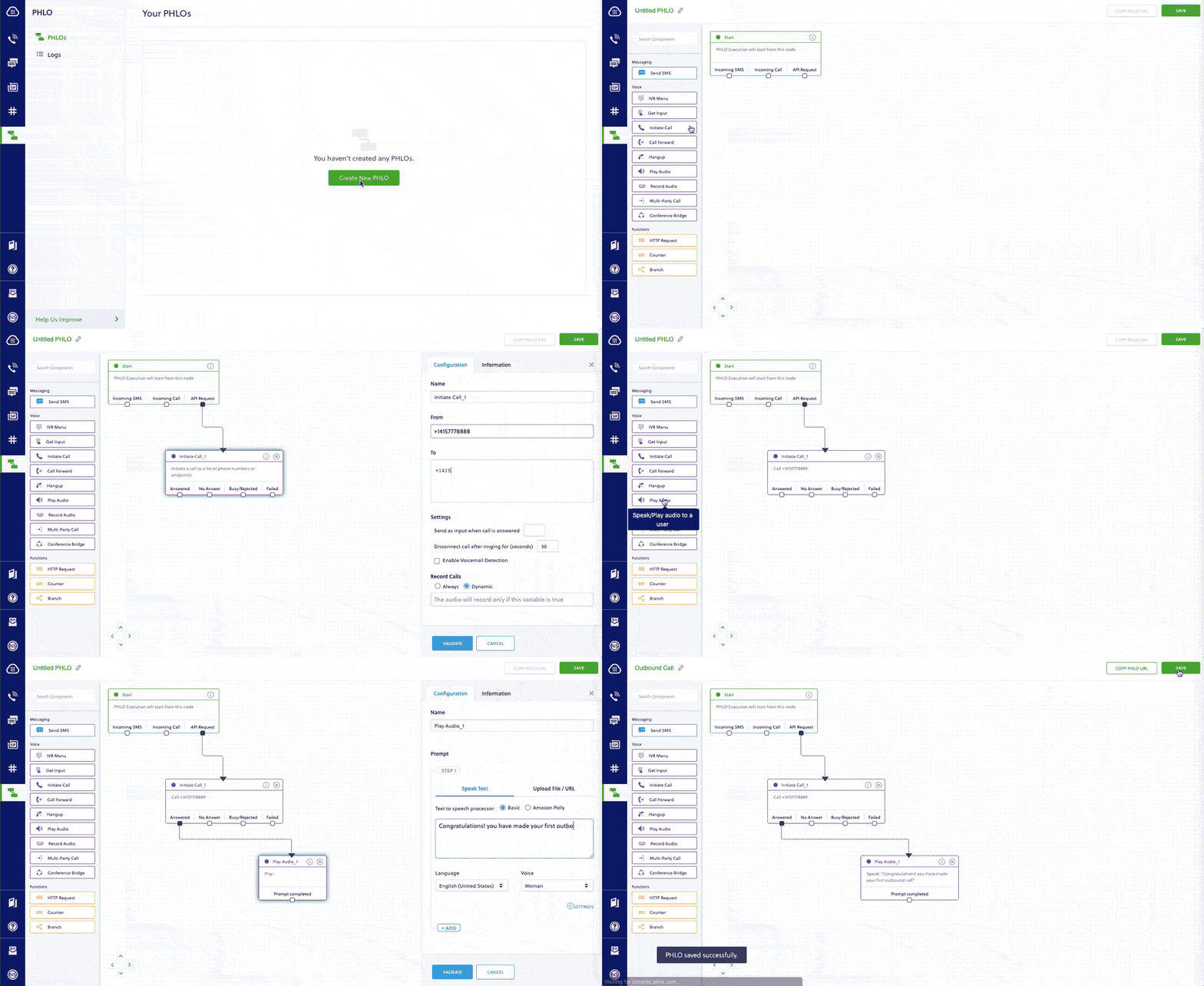
How to receive an incoming call
You can migrate an application for receiving and handling an incoming call from Twilio to Plivo just as seamlessly, as in this example:
Here again, you can implement the same functionality using one of our PHLO templates. Your PHLO would look like:
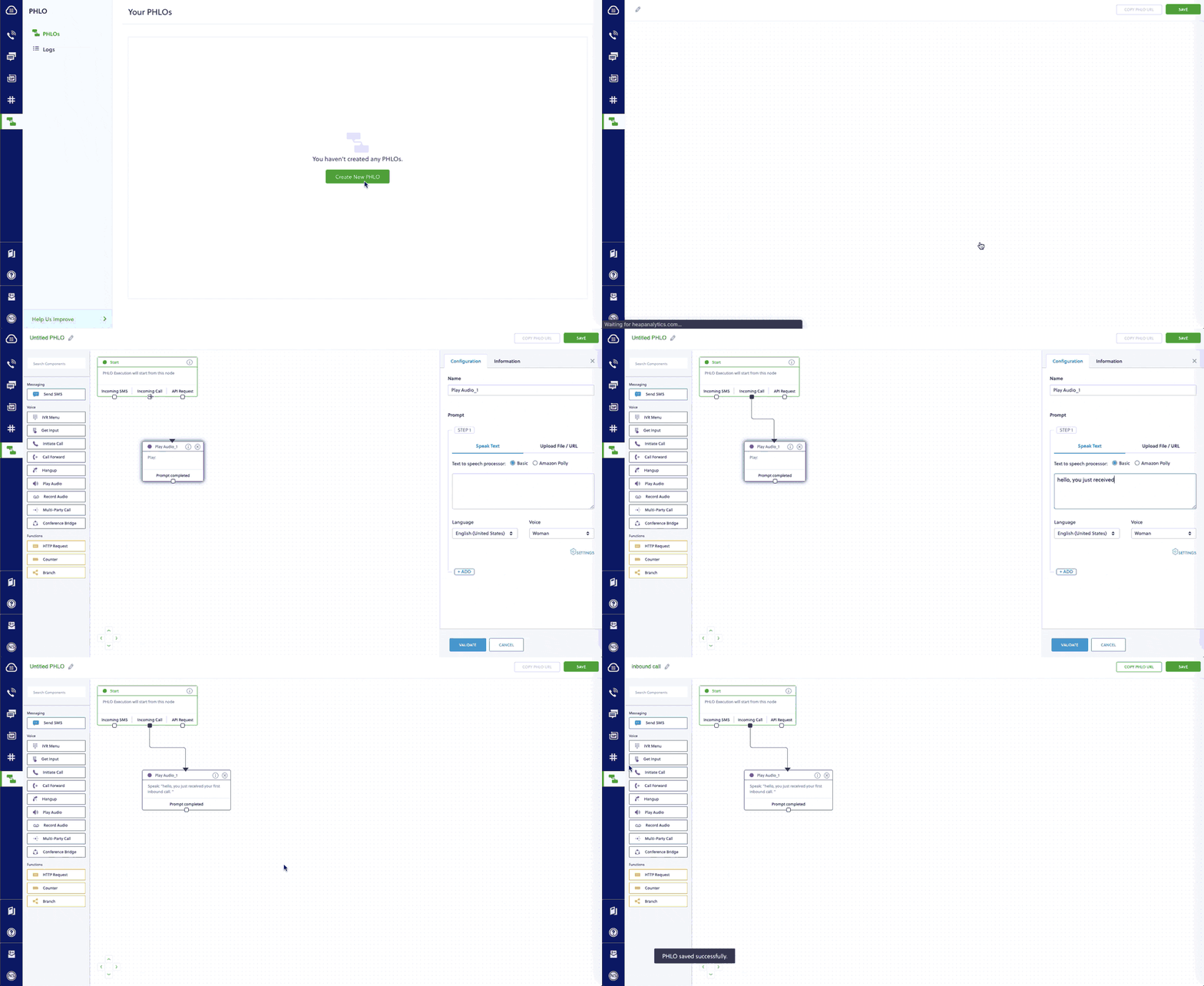
For more information about migrating your Voice applications to Plivo, check out our detailed use case guides, available for all seven programming languages and PHLO.
How to forward an incoming call
You can migrate an application for forwarding an incoming call from Twilio to Plivo just as seamlessly, as in this example:
Here again, you can implement the same functionality using one of our PHLO templates. Your PHLO would look like:
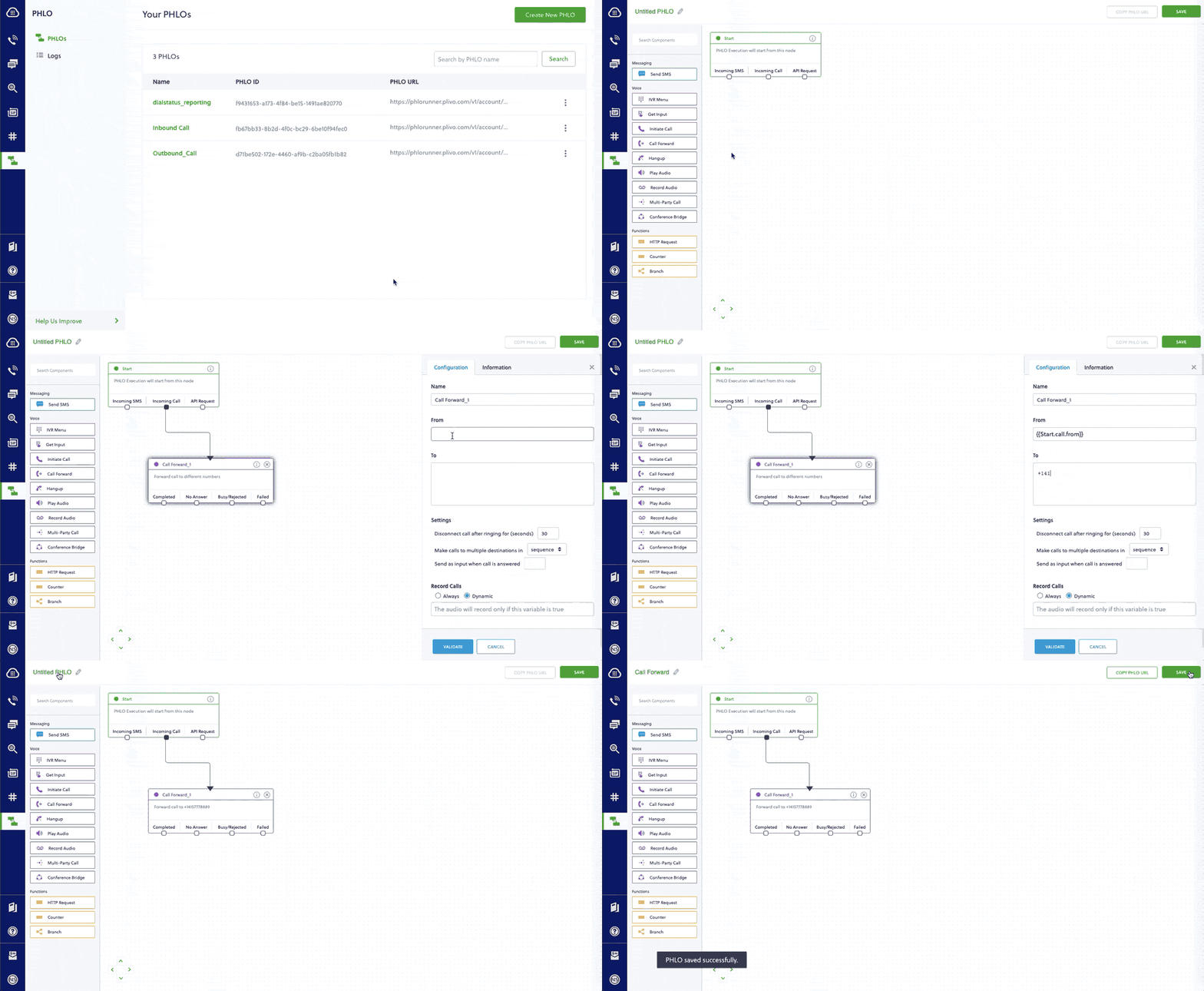
For more information about migrating your Voice applications to Plivo, check out our detailed use case guides, available for all seven programming languages and PHLO.
More use cases
You can migrate your applications serving other use cases too.
- IVR
- Voice-controlled virtual assistant
- Number masking
- Supervisor coaching
- PINless conference
- Conference with PIN
- Voicemail
- Voice alerts broadcasting
- Voice survey
- Dial status reporting
- Screen incoming calls
- Record a call
Simple and reliable
And that’s all there is to migrate your Python voice app from Twilio to Plivo. Our simple APIs work in tandem with our Premium Communications Network. See for yourself — sign up for a free trial account.

Lessons in CPaaS Leadership: Managing Costs at Scale
Manage costs at scale with Plivo. Lower unit costs than Twilio for voice calls and SMS text messaging.
Let’s face it — among communications platforms as a server (CPaaS), Twilio is the 800-pound gorilla in terms of market share. It’s the modern embodiment of the old saying “Nobody ever got fired for buying IBM.” But one thing you can’t say about Twilio is that it’s budget-friendly.
Fortunately, just as there were worthwhile alternatives to Big Blue back in the day, there are good alternatives to Twilio today. Plivo of course is one of them, and a key advantage is that it lets businesses of all sizes better manage their costs at scale. In this latest post in our Lessons in CPaaS Leadership series, we focus on all the ways a platform can save — or cost — a business money.
What costs do businesses that use cloud communications platforms have to consider? They start with unit costs to send messages and make calls, but they also include things like support contracts and sometimes phone number rental.
On a unit cost basis, it’s easy to see Plivo’s advantages. Check out our prices; check out Twilio’s. Individual line items vary, but Plivo is lower in every case — on average around 35% lower. We wrote a blog post that dives into the details.
In both cases, the individual rate differences are tiny: It costs half a cent to send an SMS text message through Plivo, .75 cents through Twilio, for instance. But you wouldn’t need a CPaaS platform if you were sending just a few messages a day. When you scale up to business volumes, those tiny differences add up to tens of thousands of dollars per month. That’s a significant amount you can save with Plivo every month.
Quality affects cost
But there’s more to the cost equation than unit costs. Consider quality of service. If your CPaaS can’t reliably deliver text messages across every locale where you have customers, you have to add in the cost of resends. Similarly, with voice calls, poor connections can require people to hang up and try again. You pay for every voice call made and received, so if you need multiple attempts to get a clear line as a result of poor quality, the costs increase quickly. Lower quality also leads to higher customer support costs.
Plivo emphasizes connection quality because our customers demand reliable, high-quality routes. Over the past decade we’ve built a premium communications network that none of our competitors can match, thanks to direct partnerships with Tier 1 carrier networks all across the globe. We rely on high-quality local carriers, and don’t try to cut costs by using cheaper aggregators that exploit lower-quality routes. Low latency and high reliability mean your messages and voice calls need fewer retries than with other CPaaS alternatives.
Our direct partnerships and strong carrier relationships also let us lower costs, because the volume of traffic we send across our partners networks enables them to charge lower rates, and the savings we receive are reflected in the rates we offer.
It works for Deckers
Plivo customer Deckers Brands has seen how well Plivo can save an organization money. In an effort to lower support costs, the footwear giant built an application that texted customers to let them know where their orders were every step of the way. Adopting Plivo was nearly seamless — with a simple API and great documentation, implementing Plivo only took a week, says Jacob Martinez, project manager for Deckers’ ecommerce team.
With better communication, the company succeeded in reducing its support costs. The average cost per contact, Martinez says, is less than half of one percent of the cost of telephone contact, and track-package calls have decreased between 15 and 20% year-over-year since the launch of SMS delivery status notification. Using SMS to preempt those calls has paid for itself many times over.
What’s better than low cost? No cost!
What better way to manage costs at scale than to have no cost? In countries where receiving SMS messages is supported, Plivo lets businesses get incoming text messages for free. Unit costs of zero scale very well.
We also offer free trial accounts, and even give prospective customers usage credits so they can try building applications for any use case.
What’s the bottom line?
If two solutions can meet their needs, people generally decide between them on the basis of cost. Plivo is a cost-effective solution for small, midsize, and enterprise businesses because it helps them manage costs as their usage scales up. After a one-time migration project (and we make migration easy) you can be banking savings every month on your voice and SMS communications.
For more information on Plivo’s advantages, read our other Lessons in CPaaS Leadership blog posts: Find out why reliability, a strong carrier network, consultative customer support, and feature parity with Twilio make Plivo stand out among cloud communications platforms.

How to Migrate Your Python SMS Application from Twilio to Plivo
Plivo's SMS API and Voice API enables businesses to communicate with their customers at global scale. Sign up for free now.
Migrating your Python SMS app from Twilio to Plivo is a seamless and painless process. The two companies’ API structures, implementation mechanisms, XML structure, SMS message processing, and voice call processing are similar. We wrote this technical comparison so that you can scope between Twilio and Plivo APIs for a seamless migration.
Understanding the differences between Twilio and Plivo development
Most of the APIs and features that are available on Twilio are also available on Plivo and the implementation mechanism is easier as the steps involved are almost identical. This table gives a side-side comparison of the two companies’ features and APIs. An added advantage with Plivo is that not only can you code using the old familiar API/XML method, you can also implement your use cases using PHLO (Plivo High Level Objects), a visual workflow builder that lets you create workflows by dragging and dropping components onto a canvas — no coding required.
Plivo offers one unique advantage: Not only can you code using APIs and XML, you can also implement your use cases using PHLO (Plivo High Level Objects), a visual workflow builder that lets you create workflows by dragging and dropping components onto a canvas — no coding required.
Plivo account creation
Start by signing up for a free trial account that you can use to experiment with and learn about our services. The free trial account comes with free credits, and you can add more as you go along. You can also add a phone number to your account to start testing the full range of our voice and SMS features. A page in our support portal walks you through the signup process.
You can also port your numbers from Twilio to Plivo, as we explain in this guide.
Migrating your Python SMS application
You can migrate your existing application from Twilio to Plivo by refactoring the code, or you can try our intuitive visual workflow builder PHLO. To continue working with the APIs, use one of the quickstart guides to set up a development environment for your preferred language. Plivo offers server SDKs in seven languages: Python, Node.js, .NET, Java, Python, Ruby, and Go. For another alternative that lets you evaluate Plivo’s SMS APIs and their request and response structure, use our Postman collections.
How to send an SMS message
Let’s take a look at the process of refactoring the code to migrate your app from Twilio to Plivo to set up a simple Python application to send an SMS message by changing just a few lines of code.
Alternatively, you can implement the same functionality using one of our PHLO templates. For example, if you want to send an SMS message, your PHLO would be this:

How to receive and reply to SMS
You can migrate an application for receiving and replying to an incoming SMS from Twilio to Plivo just as seamlessly, as in this example:
Here again, you can implement the same functionality using one of our PHLO templates. Your PHLO would look like:

For more information about migrating your SMS applications to Plivo, check out our detailed use case guides, available for all seven programming languages and PHLO.
How to send an MMS message
Let’s take a look at the process of refactoring the code to migrate your app from Twilio to Plivo to set up a simple Python application to send an MMS message by changing just a few lines of code.
Alternatively, you can implement the same functionality using one of our PHLO templates. For example, if you want to send an MMS message, your PHLO would be this:

More use cases
You can migrate your applications serving other use cases too.
- Two-factor authentication
- Forward incoming SMS
- Delivery reports
- SMS alerts
- SMS marketing
- SMS notifications
- SMS survey
- SMS autoresponder
- Forward SMS to email
- Receive MMS
Simple and reliable
And that’s all there is to migrate your Python SMS app from Twilio to Plivo. Our simple APIs work in tandem with our Premium Communications Network to guarantee the highest possible delivery rates and the shortest possible delivery times for your SMS messages. See for yourself — sign up for a free trial account.

Deepgram AI Summit — Voice is an Essential Asset for All Companies
Plivo CEO Venky B joined the Deepgram AI Summit to discuss the importance of voice as an essential asset for companies.
Plivo co-founder and CEO Venky B. spoke during a recent online summit about voice-enabled experiences. The event was sponsored by speech-to-text platform Deepgram, which provides speech APIs to deliver AI-enhanced transcription.
Deepgram CEO and Co-Founder Scott Stephenson started the event with a keynote in which he pointed out that voice can bring people together during these days when we’re all staying apart. He noted the value of AI to handle tasks and save expensive human time for uses for which humans are best suited. You can check out the recording of the event for his discussion on the relative ease of labeling images, which is a mature technology, and extracting insights from audio.
Some of the difficulties with speech recognition up until now that Stephenson noted included one-size-fits-all speech models that don’t take into account specific use cases, such as a company’s product names or industry acronyms, and may be challenged by things like accents and background noise. Customers can’t improve the accuracy of these off-the-shelf models. AI-assisted technology like Deepgram’s can train models to perform better — and better performance, meaning both speed and accuracy, matters for downstream tasks. And to be useful, actions have to be repeatable, which means they have to be cost-effective.
The roundtable Venky participated in was the first of three during the summit, and focused on the potential for voice technology and voice data. Moderator Dan Miller, Lead Analyst and Founder of Opus Research, hosted the panel, which also included
- Pete Ellis — Chief Product Officer, Red Box
- Shadi Baqleh — Chief Operating Officer, Deepgram
- Ted McKenna — SVP, Research and Innovation, Tethr

Venky noted that we’re seeing more adoption of voice for sales and customer use cases. In the post-COVID world there’s been huge acceleration around voice interactions, voice transcription, and voice analytics.
Miller cited an Opus Research survey that confirmed a trend toward real-time transcription use cases. Ellis noted that real-time transcription for sales and agent assistance has exploded in the last four months.
Baqleh said that over the last five or six months, half of Deepgram’s opportunities have involved real-time assistance. He cited as an example the benefit of immediate close-captioning for meetings that involve remote workers, and he pointed out that people are now more willing to be recorded than they were before the pandemic.
Ellis raised contact centers as an example, pointing out that there can be about 50 pieces of metadata per call for contact center agents. Getting a company to adopt voice transcriptions and perform analysis on them is a challenge because people don’t know what they don’t know, he said.
Venky agreed that agent assist is a huge use (which, though it didn’t come up, is part of the reason for Plivo’s new Contacto contact center platform). He pointed out the potential benefit of tagging and categorizing conversations and using support conversation information to inform marketing and sales initiatives. McKenna agreed with the value of “closed-loop actions” post conversations — taking steps to make sure customers are happy. Miller also pointed out the value of detecting in real time whether agents have fallen out of compliance with some mandated compliance practice.
Moderator Miller then wondered whether, given user acceptance of chatbots over the last few years, there were implications for voicebots. Venky said, “We’re seeing hybrid interactions. Internally we call this Jarvis. How do we augment customer assists, even if there’s a human being in the interaction — then how do we take this intelligence back and feed it into the bots?”
McKenna brought up the trend toward automating rote tasks in customer interactions, but asked, “Is it for them or for us? Do customers prefer that? I think that’s an open question.”
Baqleh said, “I think it’s both.” He said if you can involve AI into conversation and workflow you’re better off. You’ll have more efficient and faster ways to have customer responses and solve customer problems. The more you can help customers with their personal workflows, he said, the better off you are.
How to start exploiting voice technology
In the final part of the discussion, all the participants agreed that voice technology today is scalable and reliable, and each suggested a good way to start using it.
Ellis said you start by capturing information and putting it into a format that’s usable. Then you can figure out what you can do with it. You can use it to see how your company is dealing with its customers.
Baqleh said that if companies don’t start doing that now they’re going to fall behind. But, he suggested, “don’t boil the ocean” — pick one use case, win at that, then expand.
McKenna agreed, saying customer disloyalty is the place to start. Businesses should look for ways to improve situations with unhappy customers.
With the final word, Venky suggested picking a use case with a high ROI, so if you execute well it will have the most impact.
To close the session, Miller pointed out that voice technology isn’t just a call center story. It’s useful across the whole organization. Multiple touchpoints can benefit from the ingestion of all conversations and treating that information as valuable input.

How to Easily Migrate Your PHP Voice Application from Twilio to Plivo
Plivo's SMS API and Voice API enables businesses to communicate with their customers at global scale. Sign up for free now.
Migrating from Twilio to Plivo is a seamless and painless process. The two companies’ API structures, implementation mechanisms, XML structure, SMS message processing, and voice call processing are similar. We wrote this technical comparison between Twilio and Plivo APIs so that you can scope the code changes for a seamless migration.
Understanding the differences between Twilio and Plivo development
Most of the APIs and features that are available on Twilio are also available on Plivo and the implementation mechanism is easier as the steps involved are almost identical. This table gives a side-side comparison of the two companies’ features and APIs. An added advantage with Plivo is that not only can you code using the old familiar API/XML method, you can also implement your use cases using PHLO (Plivo High Level Objects), a visual workflow builder that lets you create workflows by dragging and dropping components onto a canvas — no coding required.
Plivo account creation
Start by signing up for a free trial account that you can use to experiment with and learn about our services. The free trial account comes with free credits, and you can add more as you go along. You can also add a phone number to your account to start testing the full range of our voice and SMS features. A page in our support portal walks you through the signup process.
You can also port your numbers from Twilio to Plivo, as we explain in this guide.
Migrating your Voice application
As mentioned earlier, you can migrate your existing application from Twilio to Plivo by refactoring the code, or you can try our intuitive visual workflow builder PHLO. If you prefer the API approach, you can follow one of the voice quickstart guides based on your preferred language and web framework. Plivo offers server SDKs in seven languages: PHP, Node.js, .NET, Java, Python, Ruby, and Go. For another alternative that lets you evaluate Plivo’s SMS APIs and their request and response structure, use our Postman collections.
How to make an outbound call
Let’s take a look at the process of refactoring the code to migrate your app from Twilio to Plivo to set up a simple PHP application to make an outbound call by changing just a few lines of code.
Alternatively, you can implement the same functionality using one of our PHLO templates. For example, if you want to make an outbound call, your PHLO would be this:
How to receive an incoming call
You can migrate an application for receiving and handling an incoming call from Twilio to Plivo just as seamlessly, as in this example:
Here again, you can implement the same functionality using one of our PHLO templates. Your PHLO would look like:
For more information about migrating your Voice applications to Plivo, check out our detailed use case guides, available for all seven programming languages and PHLO.
How to forward an incoming call
You can migrate an application for forwarding an incoming call from Twilio to Plivo just as seamlessly, as in this example:
Here again, you can implement the same functionality using one of our PHLO templates. Your PHLO would look like:
For more information about migrating your Voice applications to Plivo, check out our detailed use case guides, available for all seven programming languages and PHLO.
More use cases
You can migrate your applications serving various other use cases too.
- IVR
- Voice-controlled virtual assistant
- Number masking
- Supervisor coaching
- PINless conference
- Conference with PIN
- Voicemail
- Voice alerts broadcasting
- Voice survey
- Dial status reporting
- Screen incoming calls
- Record a call
Simple and reliable
And that’s all there is to migrate your PHP Voice app from Twilio to Plivo either using Plivo’s PHP SDK or PHLO. Our simple APIs work in tandem with our Premium Communications Network. See for yourself — sign up for a free trial account.

How to Migrate Your PHP SMS Application from Twilio to Plivo
Plivo's SMS API and Voice API enables businesses to communicate with their customers at global scale. Sign up for free now.
Migrating your PHP SMS app from Twilio to Plivo is a seamless and painless process. The two companies’ API structures, implementation mechanisms, XML structure, SMS message processing, and voice call processing are similar. We wrote this technical comparison so that you can scope between Twilio and Plivo APIs for a seamless migration.
Understanding the differences between Twilio and Plivo development
Most of the APIs and features that are available on Twilio are also available on Plivo and the implementation mechanism is easier as the steps involved are almost identical. This table gives a side-side comparison of the two companies’ features and APIs. An added advantage with Plivo is that not only can you code using the old familiar API/XML method, you can also implement your use cases using PHLO (Plivo High Level Objects), a visual workflow builder that lets you create workflows by dragging and dropping components onto a canvas — no coding required.
Plivo offers one unique advantage: Not only can you code using APIs and XML, you can also implement your use cases using PHLO (Plivo High Level Objects), a visual workflow builder that lets you create workflows by dragging and dropping components onto a canvas — no coding required.
Plivo account creation
Start by signing up for a free trial account that you can use to experiment with and learn about our services. The free trial account comes with free credits, and you can add more as you go along. You can also add a phone number to your account to start testing the full range of our voice and SMS features. A page in our support portal walks you through the signup process.
You can also port your numbers from Twilio to Plivo, as we explain in this guide.
Migrating your PHP SMS application
You can migrate your existing application from Twilio to Plivo by refactoring the code, or you can try our intuitive visual workflow builder PHLO. To continue working with the APIs, use one of the quickstart guides to set up a development environment for your preferred language. Plivo offers server SDKs in seven languages: PHP, Node.js, .NET, Java, Python, Ruby, and Go. For another alternative that lets you evaluate Plivo’s SMS APIs and their request and response structure, use our Postman collections.
How to send an SMS message
Let’s take a look at the process of refactoring the code to migrate your app from Twilio to Plivo to set up a simple PHP application to send an SMS message by changing just a few lines of code.
Alternatively, you can implement the same functionality using one of our PHLO templates. For example, if you want to send an SMS message, your PHLO would be this:
How to receive and reply to SMS
You can migrate an application for receiving and replying to an incoming SMS from Twilio to Plivo just as seamlessly, as in this example:
Here again, you can implement the same functionality using one of our PHLO templates. Your PHLO would look like:
For more information about migrating your SMS applications to Plivo, check out our detailed use case guides, available for all seven programming languages and PHLO.
How to send an MMS message
Let’s take a look at the process of refactoring the code to migrate your app from Twilio to Plivo to set up a simple PHP application to send an MMS message by changing just a few lines of code.
Alternatively, you can implement the same functionality using one of our PHLO templates. For example, if you want to send an MMS message, your PHLO would be this:
More use cases
You can migrate your applications serving other use cases too.
- Two-factor authentication
- Forward incoming SMS
- Delivery reports
- SMS alerts
- SMS marketing
- SMS notifications
- SMS survey
- SMS autoresponder
- Forward SMS to email
- Receive MMS
Simple and reliable
And that’s all there is to migrate your PHP SMS app from Twilio to Plivo either using Plivo’s PHP SDK or PHLO. Our simple APIs work in tandem with our Premium Communications Network to guarantee the highest possible delivery rates and the shortest possible delivery times for your SMS messages. See for yourself — sign up for a free trial account.

10 Best Practices for Customer Communications
The foundation of customer communications is “right time, right place, right message.” Learn how to nail it every time with great customer service.
The foundation of any strategic communications is “right time, right place, right message.” A notoriously difficult challenge made somewhat simpler by the technology available to us today.
Contacto’s mission is to enable omnichannel customer communications with a personal touch — especially in a time when human connection is so important. We’ve come up with this list of 10 communications priorities to help you meet new and changing customer expectations, so you can provide a better customer experience and enhance loyalty.
Keep in touch
82% of U.S. consumers want more of the human element in their interactions with agents. That requires open lines of communication, across your audience’s preferred digital channels.
Omnichannel is best
The last two decades have seen a proliferation of new communications channels, from the rise of SMS/MMS, to social media, and now nearly ubiquitous mobile phone and mobile app usage. Your customers are everywhere — and they’d like you to be, too, because it’s more convenient that way. They want you to be there when they need you.
Offer self-service
Research from customer service expert Shep Hyken found that 67% of respondents use digital self-service tools, including AI-powered chat agents, and 41% said they prefer them. While there’s still a large percentage that prefers live agents, self-service can siphon off the low-touch enquiries to give agents more time to handle live interactions.
Be nimble
Over the last two years, amidst constantly changing conditions, agility has become a real competitive advantage. A proactive notification can keep customers in the loop when things are changing fast.
Consider CDC guidance that may lead to store closings or openings, demand-side shifts shaking up forecasting, and supply chain woes impacting inventory levels and fulfillment. Brands had to communicate fast and transparently.
Get the channel right
First, let’s be clear — omnichannel doesn’t mean every channel. Different consumer demographics, different business models, and different verticals all have unique needs — and brands will have a specific face they want to show to the world. That should all impact your channel mix. Plus, get to know what customer interaction types work best on which channels, so you can guide consumers to convenient customer journeys with the lowest friction.
Follow best practices
Omnichannel isn’t a whole new form of customer service. Classic best practices still apply here, in many cases. Even more so, perhaps, because an omnichannel contact center is so well suited to optimizing for metrics like first contact resolution, average response time, and measuring customer satisfaction.
Be dynamic
What’s convenient or most effective for one customer may be ineffective — or even inaccessible — for another. Being dynamic means that you can switch communication channels mid-conversation without losing the thread, to give your customer base a convenient and flexible journey to resolution.
Have a reliable backup
On Oct. 4, 2021, Facebook, Instagram, and WhatsApp were down for the better part of a day. Back in December 2020, Gmail users were unable to fully access services on two separate occasions, over two days.
Outages happen, but if you’re in a competitive market, you don’t want a single minute of downtime to knock you off balance. Giving your audience more than one way to contact your customer service team creates redundancy that ensures you meet your customers’ needs when they need you
Carrier network matters
If you want to create great customer experiences, you can’t take carrier quality for granted.
Contacto is powered by Plivo’s Premium Communications Network. In Plivo’s 10 years, they learned that reliability depended upon building their own network of high-quality carriers, and that:
- Strong technology and infrastructure alone cannot compensate for poor carrier network quality.
- Relying on aggregators is not a good way to ensure carrier network quality.
- Building a premium carrier network requires redundancy.
- The infrastructure and technology layer all need to have the same commitment to quality.
- No provider can build a quality carrier network overnight.
Our advice to you: Be proactive and don’t accept carrier network quality as a given.
Choose a vendor that’s committed to your success
Using a cloud platform for communication services beats maintaining your own infrastructure. With a cloud contact center, you don’t need to buy and maintain expensive equipment, or handle carrier relationships in-house. You also don’t need expensive expert developers to keep the software updated.
Look for a vendor that minimizes complexity and makes your success their priority, as Contacto does.
Ensuring customer success
Our commitment to our customers doesn’t end once they’re up and running. To help you get the most from us, we want to know about your business and how you use Contacto. Our customer success team has a great track record of keeping customers happy. They’re one of our not-so-secret weapons in our mission to provide superlative customer experience.
Our relationships carry the day
With telecommunications, not all problems come from the customer side of the connection. Often businesses have issues with carrier networks and connectivity, but we’re here to deal with the carriers to fix things
Need help bringing it all together?
Contacto offers an easy-to-use way to deliver streamlined, omnichannel customer service. It integrates with your existing business systems to give customer service teams all the data they need, from a single pane of glass. Read more about Contacto’s channels and features.

How to Migrate Your Node.js Voice Application from Twilio to Plivo
Plivo's SMS API and Voice API enables businesses to communicate with their customers at global scale. Sign up for free now.
Migrating from Twilio to Plivo is a seamless and painless process. The two companies’ API structures, implementation mechanisms, XML structure, SMS message processing, and voice call processing are similar. We wrote this technical comparison between Twilio and Plivo APIs so that you can scope the code changes for a seamless migration.
Understanding the differences between Twilio and Plivo development
Most of the APIs and features that are available on Twilio are also available on Plivo and the implementation mechanism is easier as the steps involved are almost identical. This table gives a side-side comparison of the two companies’ features and APIs. An added advantage with Plivo is that not only can you code using the old familiar API/XML method, you can also implement your use cases using PHLO (Plivo High Level Objects), a visual workflow builder that lets you create workflows by dragging and dropping components onto a canvas — no coding required.
Plivo account creation
Start by signing up for a free trial account that you can use to experiment with and learn about our services. The free trial account comes with free credits, and you can add more as you go along. You can also add a phone number to your account to start testing the full range of our voice and SMS features. A page in our support portal walks you through the signup process.
You can also port your numbers from Twilio to Plivo, as we explain in this guide.
Migrating your voice application
As mentioned earlier, you can migrate your existing application from Twilio to Plivo by refactoring the code, or you can try our intuitive visual workflow builder PHLO. If you prefer the API approach, you can follow one of the voice quickstart guides based on your preferred language and web framework. Plivo offers server SDKs in seven languages: PHP, Node.js, .NET, Java, Python, Ruby, and Go. For another alternative that lets you evaluate Plivo’s SMS APIs and their request and response structure, use our Postman collections.
How to make an outbound call
Let’s take a look at the process of refactoring the code to migrate your app from Twilio to Plivo to set up a simple Node.js application to make an outbound call by changing just a few lines of code.
Alternatively, you can implement the same functionality using one of our PHLO templates. For example, if you want to make an outbound call, your PHLO would be this:
How to receive an incoming call
You can migrate an application for receiving and handling an incoming call from Twilio to Plivo just as seamlessly, as in this example:
Here again, you can implement the same functionality using one of our PHLO templates. Your PHLO would look like:
For more information about migrating your Voice applications to Plivo, check out our detailed use case guides, available for all seven programming languages and PHLO.
How to forward an incoming call
You can migrate an application for forwarding an incoming call from Twilio to Plivo just as seamlessly, as in this example:
Here again, you can implement the same functionality using one of our PHLO templates. Your PHLO would look like:
For more information about migrating your Voice applications to Plivo, check out our detailed use case guides, available for all seven programming languages and PHLO.
More use cases
You can migrate your applications serving other use cases too.
- IVR
- Voice-controlled virtual assistant
- Number masking
- Supervisor coaching
- PINless conference
- Conference with PIN
- Voicemail
- Voice alerts broadcasting
- Voice survey
- Dial status reporting
- Screen incoming calls
- Record a call
Simple and reliable
And that’s all there is to migrate your Node.js voice app from Twilio to Plivo. Our simple APIs work in tandem with our Premium Communications Network. See for yourself — sign up for a free trial account.

How to Migrate Your Node.js SMS Application from Twilio to Plivo
Plivo's SMS API and Voice API enables businesses to communicate with their customers at global scale. Sign up for free now.
Migrating your Node.js SMS app from Twilio to Plivo is a seamless and painless process. The two companies’ API structures, implementation mechanisms, XML structure, SMS message processing, and voice call processing are similar. We wrote this technical comparison so that you can scope between Twilio and Plivo APIs for a seamless migration.
Understanding the differences between Twilio and Plivo development
Most of the APIs and features that are available on Twilio are also available on Plivo and the implementation mechanism is easier as the steps involved are almost identical. This table gives a side-side comparison of the two companies’ features and APIs. An added advantage with Plivo is that not only can you code using the old familiar API/XML method, you can also implement your use cases using PHLO (Plivo High Level Objects), a visual workflow builder that lets you create workflows by dragging and dropping components onto a canvas — no coding required.
Plivo offers one unique advantage: Not only can you code using APIs and XML, you can also implement your use cases using PHLO (Plivo High Level Objects), a visual workflow builder that lets you create workflows by dragging and dropping components onto a canvas — no coding required.
Plivo account creation
Start by signing up for a free trial account that you can use to experiment with and learn about our services. The free trial account comes with free credits, and you can add more as you go along. You can also add a phone number to your account to start testing the full range of our voice and SMS features. A page in our support portal walks you through the signup process.
You can also port your numbers from Twilio to Plivo, as we explain in this guide.
Migrating your Node.js SMS application
You can migrate your existing application from Twilio to Plivo by refactoring the code, or you can try our intuitive visual workflow builder PHLO. To continue working with the APIs, use one of the quickstart guides to set up a development environment for your preferred language. Plivo offers server SDKs in seven languages: PHP, Node.js, .NET, Java, Python, Ruby, and Go. For another alternative that lets you evaluate Plivo’s SMS APIs and their request and response structure, use our Postman collections.
How to send an SMS message
Let’s take a look at the process of refactoring the code to migrate your app from Twilio to Plivo to set up a simple Node.js application to send an SMS message by changing just a few lines of code.
Alternatively, you can implement the same functionality using one of our PHLO templates. For example, if you want to send an SMS message, your PHLO would be this:
How to receive and reply to SMS
You can migrate an application for receiving and replying to an incoming SMS from Twilio to Plivo just as seamlessly, as in this example:
Here again, you can implement the same functionality using one of our PHLO templates. Your PHLO would look like:
For more information about migrating your SMS applications to Plivo, check out our detailed use case guides, available for all seven programming languages and PHLO.
How to send an MMS message
Let’s take a look at the process of refactoring the code to migrate your app from Twilio to Plivo to set up a simple Node.js application to send an MMS message by changing just a few lines of code.
Alternatively, you can implement the same functionality using one of our PHLO templates. For example, if you want to send an MMS message, your PHLO would be this:
More use cases
You can migrate your applications serving various other use cases too.
- Two-factor authentication
- Forward incoming SMS
- Delivery reports
- SMS alerts
- SMS marketing
- SMS notifications
- SMS survey
- SMS autoresponder
- Forward SMS to email
- Receive MMS
Simple and reliable
And that’s all there is to migrate your Node.js SMS app from Twilio to Plivo. Our simple APIs work in tandem with our Premium Communications Network to guarantee the highest possible delivery rates and the shortest possible delivery times for your SMS messages. See for yourself — sign up for a free trial account.
It’s easy to get started. Sign up for free.
Create your account and receive trial credits or get in touch with us.
